
Posts Feed — Master-Detail View
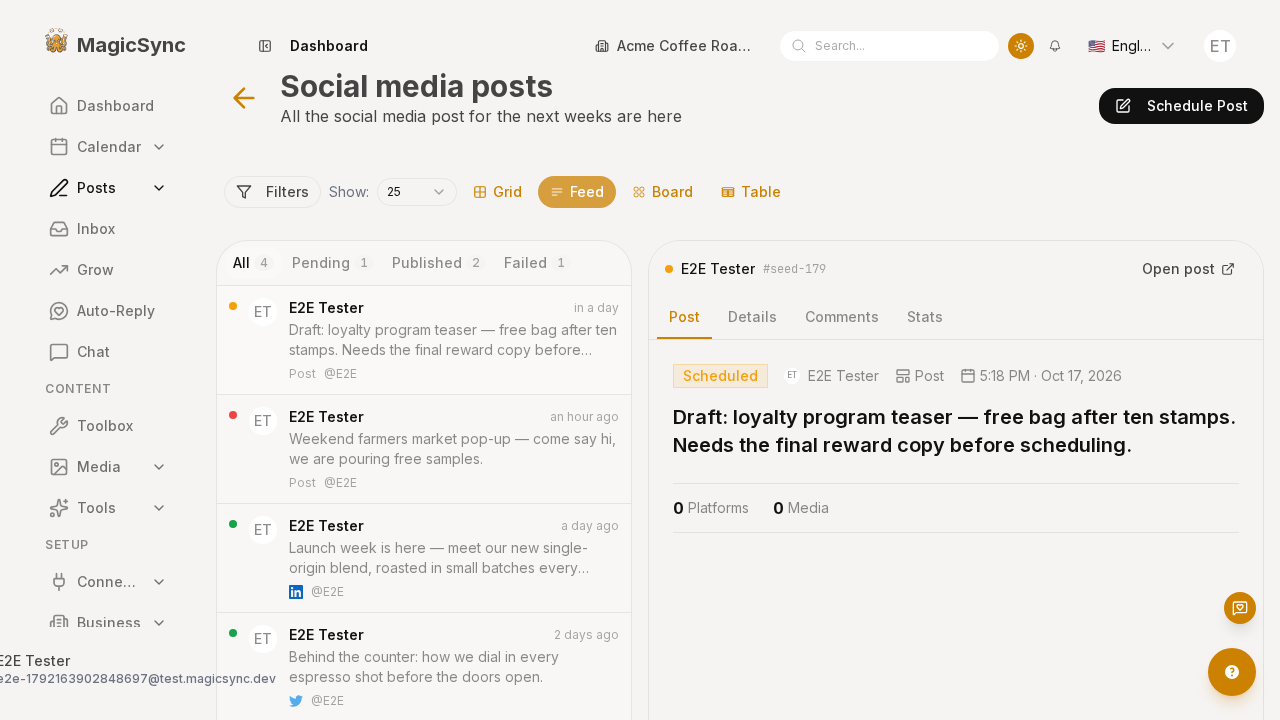
/app/posts ships four views (Grid, Feed, Board, Table). The Feed view used to be a single-column X-style timeline: you could scan posts or open one, never both, and there was no way to group the list by status.
It is now an inbox-style master-detail surface:
- Left pane — a compact post list with
All / Pending / Published / Failedtabs (each carrying a live count), a status dot, the author, a 2-line preview, the platform icons and a relative timestamp. - Right pane — the full detail of the selected post, with the same
Post / Details / Comments / Statstabs the detail route renders.
Selecting a row swaps the right pane. On screens below lg the split collapses to the list only; tapping a row opens the detail route instead.
Why
The detail route (/app/posts/feeds/[id]) already rendered everything we needed — post body, media, platform statuses, live comments and insights. The problem was the round-trip: every post you wanted to read meant leaving the list. A master-detail layout removes that round-trip while keeping the route intact for direct links.
How it works
One detail surface, two hosts
packages/scheduler/app/components/scheduler/posts/components/PostDetailPane.vue holds the entire detail UI (header, tabs, post body, media, platform statuses, raw-data toggle, comments and stats). Both hosts render it:
| Host | Wiring |
|---|---|
/app/posts/feeds/[id] (packages/site/app/pages/app/posts/feeds/[id].vue) | fetches the post, passes show-back, handles @back |
Feed right pane (…/components/views/PostsFeedView.vue) | passes the selected list row and :open-to for its "Open post" button |
Because the pane takes a plain PostWithAllData | null, the Feed view never has to re-fetch: /api/v1/posts already returns each post with user, assets and platformPosts, which is exactly what the pane reads.
The pane also accepts an optional error string and emits retry, so a failed route fetch shows a real message and a retry button instead of a spinner.
Status filtering
The four tabs filter the already-loaded list client-side (no extra request) and show a count per status. filteredPosts is a plain computed over the posts prop; a watch keeps a valid selection — when the active tab hides the current post, or a business switch replaces the list, the first visible row is selected.
Layout
grid lg:grid-cols-[26rem_minmax(0,1fr)] lg:h-[calc(100dvh-8rem)]
├── left  : rounded card, sticky-free, tabs + scrollable list (min-h-0 flex-1)
└── right : hidden below lg, scrollable detail pane
Both panes are lg:h-full, so the split fills the content area edge to edge. Empty states are explicit: a distinct message for "no posts yet" versus "no posts match this filter", and a "select a post" placeholder in the right pane.
i18n
Feed copy lives in packages/site/app/pages/app/posts/posts.json (feeds.*: filter labels, empty states, selection hint). Detail copy lives in packages/site/app/pages/app/posts/feeds/feeds.json (postDetail.*), which the pane, the comments view and the stats view all resolve via their i18n block.
Files touched
packages/scheduler/app/components/scheduler/posts/components/PostDetailPane.vue(new)packages/scheduler/app/components/scheduler/posts/components/views/PostsFeedView.vue(rewritten)packages/site/app/pages/app/posts/feeds/[id].vue(now delegates to the pane)packages/site/app/pages/app/posts/posts.json,…/feeds/feeds.json(new keys, 4 locales)
Gotcha: useAsyncData with a getter key + watch
The first cut of [id].vue used useAsyncData(() => \post-detail-${postId.value}`, handler, { watch: [postId] })with a top-levelawait. In dev the route rendered a **perpetual spinner** — the fetch resolved but datastayed null. A direct$fetchagainst/api/v1/posts/:idreturned 200 with the full payload, so the API was fine; the getter-key +watch` combination was the problem.
The route now uses an explicit ref + loadPost() awaited at setup with a watch(() => route.params.id, loadPost). If you reach for useAsyncData on a param-driven route, prefer a stable key and drive refetch yourself.
Verify
# seed posts + business, capture both routes
pnpm --filter @local-monorepo/site exec playwright test posts-feed-business.spec.ts --reporter=list
Screenshots: /img/screenshots/app-posts/feed.png, /img/screenshots/app-posts/feed-detail.png, /img/screenshots/app-posts-feeds-id/page.png.